• Dashboard
    • Cadenas Hoteleras
      • Bandeja Outlook
      • Bluesea
      • HM
      • Enkartur
      • Pestana
      • RH
      • The Palace Company
      • Hotusa-trc
      • Medplaya
      • Cordial/Brightside
      • Zafiro
      • VisitBenidorm*
      • Eurostars
      • THB!!!
    • Operators
    • Microsites
  • Data
    • Bookings
      • General
      • Bookings
      • Passangers
      • Transports
      • Hotels
      • Tickets
      • Manual Service
      • Client requests
      • MO App
      • Amendments
      • Reservas test
      • Booking Builder
    • GiftCard Purchases
    • Business intelligens
    • Hotel Repricing
    • Idea Repricing
    • Procedimientos
      • Filtro reservas
      • TravelSoft Ebooking
      • Formas de Pago
      • Manual Service
      • Recuperar Servicios
      • Tiempos de respuesta
      • Sacar Seguros Safer
      • Varios
      • Incidencias en destino
    • Webhooks
  • Giata Room Type
  • Marketing
    • Custom Mailing
    • Promotions Codes
    • Promotions Popups
    • Loyalty
  • Ideas & Users
    • Agencies
      • Agency Data
      • Domains
      • SEO
      • Credit/Deposit
      • Over Commission
      • Agencies
      • Agencias TravelC
      • Agencias Halcon
      • Discounts
    • Agency Managers
      • Over Commission
    • GiftBoxes
    • Holiday Packages
      • A tener en cuenta
      • Errores de no disponibilidad
      • Nuevos desarrollos
      • Políticas de cancelación
      • Descargas Tour Downloads
    • Ideas
    • On request Ideas
    • Profiles
    • Tours Downloads
    • Users
      • Users
      • Roles y Profile
      • Fraude
      • Proveedores Acceso BI
      • Comunicar OP fraudes
      • Ataque/posible fraude
    • Routing
    • Themes & Banners
      • Site themes
      • New Home Section
      • A tener en cuenta
  • Business Travel Platform
  • Web content
    • Amenities
    • Destination Masters
    • Priorities
      • Transports Priority
    • Accomodation Priority
    • Remarks
    • TF Amenities
    • Themes
    • Translations
    • Transport bases
    • Trip spots
    • Credentials Load Status
  • Financial
    • Consolidator Balance
    • Currency exch. rates
    • Microstie / Agency fees
    • Microstie Invoices
    • Operator Discounts
    • Operator fees
      • Defaults
      • Cálculo
      • Customs
      • Exchange
      • Payment
    • Operator invoices
    • Pending Payments
    • Retail provider fees
    • Invoices
    • User Invoice
  • Microsites
    • Countries
      • A Piñón
    • Locked Services
    • Microstie Destination
    • Microsite
      • Basic Data
      • Local / Currency
      • Map / Avail / Others
      • Premium modules
      • Login
      • Fees
      • Magic Box
      • User replicator
    • Microsite Settings
      • General
      • Search Engine
      • Web Settings
      • Microsite Settings
      • Microsite Background images
      • Help Links
      • Email Configuration
    • Operators
      • Data
      • Invoices (Invoicer)
      • VCL
      • TSV
      • VEC
      • HTS
      • VCI
      • CTM
      • VHM
      • AAT
      • STC
      • ICG
      • STR
      • LMX
      • TIE
      • TBC
    • Providers
      • Configuración
      • Consolidados
      • Extra info
      • IP Whitelist
      • API
      • Adalte
      • Air Gateway
      • Amadeus Hoteles
      • Amadeus LATAM
      • Amadeus Vuelos
      • Azul Airlines
      • Bolt
      • Booking.com
      • Carnect
      • Civitatis Tickets
      • Civitatis Transfers
      • Derbysoft
      • DIDA
      • Dingus
      • Direct Ferries
      • Domnia
      • EuropAssistance
      • Expedia
      • FastPay
      • Flexible autos
      • Flexibus
      • Galileo
      • Galileo Ryanair
      • Gol Flights
      • Holiday Taxis
      • Hotelbeds hotels
      • Hotelbeds Tickets
      • Hotelbeds Transfers
      • Hotetec
      • Hotusa / RESTEL
      • Hyperguest
      • I need tours transfers
      • Intui
      • Italo NTV
      • Kiwi
      • Monaker
      • Mozio
      • Mystifly
      • Mytransfers
      • Omnibees
      • Paximum
      • Pricetravel
      • Rail Europe
      • Rakuten
      • Repush TI
      • Sabre
      • Siliconsom
      • Sportsevents
      • Sunny Cars
      • Tictactrip
      • TravelC Accommodation
      • TravelC NDCs (Orchestra)
      • TravelExchange
      • Travelfusion
      • Travelfusion Trenes
      • Travelfusion NDC
      • Travelgate
      • Trenitalia
      • TUI Musement Tour
      • Uber
      • Viator
      • Webbeds
      • Yalago
    • Payment systems
      • Crediti welfare
      • Klarna
      • Mercado pago
      • Montevideo
      • Payfort
      • Paypal
      • Sofort
      • Stripe
      • CC Avenue / MIT
      • Unicredit
      • Funcionamiento general
    • Import PNR
  • Mappings
    • Accommodations Masters
      • Accommodations
      • Estructura
      • Giata Room Type
    • Accommodations Orphans
    • ERROR DE MAPEOS / NO DISPO
      • Procedimiento
      • Postman Accommodations
      • Postman Roomtype
      • Omnibees
      • Dingus
    • Other mappings
      • General
      • Destination
      • Ferries Route
    • Fichas de otros proveedores
  • Marketplace
    • My products
    • Resellers
      • Discover resellers
      • Manage partnerships
    • Settings
      • Fees
    • Supplier products
    • Suppliers
      • Discover supplier
      • Manage partnerships
    • Tools
  • Operations
    • Accomodations Maintenance
    • Certificates
    • Mail customizations
    • Mail sent Report
    • Notifications
    • Operations
    • Payment Recovery
    • Provider Status
    • Team & Users
    • Traces
  • CMS*
    • Brand
    • Login Images
    • Navigation menu
    • Home Landing
      • Main Image
      • Title
      • Section / Banners
    • Landing manager
    • Search Box
    • CMS Settings
    • Themes
    • Template
  • Contracts
    • Channel Hotels
      • Información básica
      • Configuración
      • TravelC - Hoteles
    • Golf
    • Closed tours
      • Crear HP
      • Error dispo transporte
      • Marketplace*
    • Hotels
      • No disponibilidad
      • Rango edades
      • Offers
      • Supplements
      • Rates
    • Insurances
    • Supplier info
    • Tickets
      • No disponibilidad
    • Transfers
      • General
      • Front
      • Basic Data
      • Route
      • Suplements
    • Transport
      • No dispo
      • Itinerary
      • Modality
      • Combinable
      • Rango edades
      • Prioridades
    • Vehicle Rental Contracts
  • Cruises
    • Ports
    • Rates
  • Contract / Support
  • MO App
  • Varios
    • Bloques de tareas
      • Ebooking (TSS)
      • Operaciones (TSS)
      • Servicios consolidados
      • Support (OPS)
      • Cadenas Hoteleras (OPS)
      • Tareas back Office (OPS)
      • CUDEIROS
      • IONOS Support
      • Soporte freshdesk
    • Canales Slack
      • Sentry-operations
      • Sentry's URGENTES
      • Operaciones
      • Mogu_chat
      • Channel - Managers
      • Op-reservas
    • Dialoga
    • Fare Rules
    • Multidestination / Ideas
    • Procedimientos
      • Guardia Sábados-Domingos / festivos
      • Reembolsos
      • Ryanair
      • Postman
      • Trello
      • Bloque Operaciones
      • Alta Claves
      • Hoteles independientes de Hotusa
      • Ventas telefónicas
      • Transfers
      • Tickets / Actividades
      • Peculiaridades/personalizaciones
      • Ebooking
      • Transportes
    • Tipos de Microsite
      • Colectivos

Comunicar OP fraudes

20 views 0

Tras los continuos ataques de usuarios fraude y quejas de operadores, os copio explicación de Ivan para evitarlos y que podéis usar para informar al OP.

THINGS TO CHECK IN ORDER TO AVOID FRAUD BOOKINGS:

CHECK USER REGISTRATIONS:

It is very recommendable to monitor the user registration from you back office OPERATIONS —->NOTIFICATIONS. Here you will see live user registrations. Pay close attention to:

1- Users registered with long strings of name including many numbers using gmail mainly:

    kometlor932@gmail.com

    edi040495@gmail.com

2- Beware of emails registered with yandex.com domain

3- Pay attention in users with email created with temporary email address webs like  https://temp-mail.org/en/change or https://www.1secmail.com/?login=1qfcn3dyho&domain=qiott.com

4- Pay special attention in users registered from IPS of countries that normallly do not belong to you target makets. Specially IPS from countries like United Stated, Russia, Mexico or Indonesia.

5- Other sign if fraud attack is that you see in minutes several users registered with similar patterns

WHAT TO DO IF WE DETECT A SUSPICIOUS USER:

We must open the user profile to check further data inserted:

1- Check the phone number (if inserted) to check if the country or area code matches de country or IP from where it was registered.
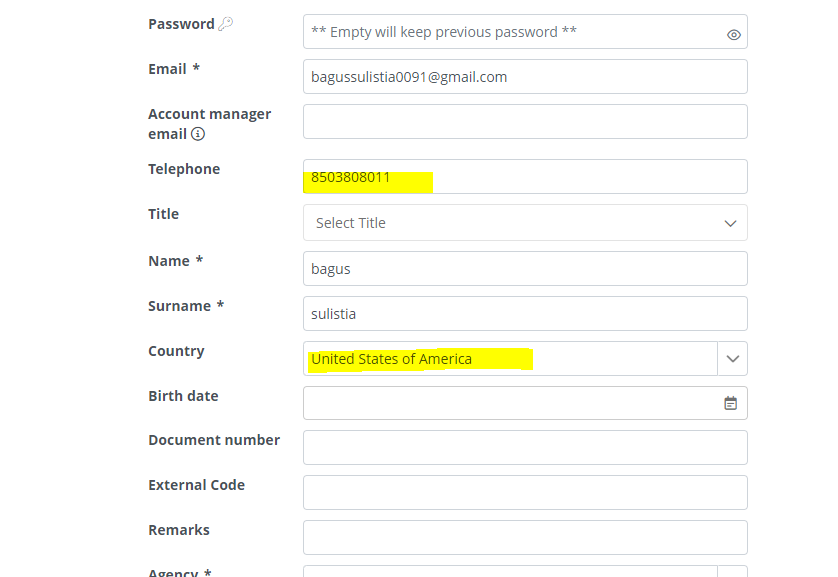
2- Check inf the country inserted matches the IP from where it was registered

If any of these 2 steps indicates discrepancies it increases the change of being a fraud user.

3- Check of google the supplied user data like the email address, phone number of names to see if there is a trace that could match and make veridic this user.

4- Chech what the user is trying to purchase, for this we can go to IDEAS & USERS —> IDEAS and in the filter option user the purchase attemps option
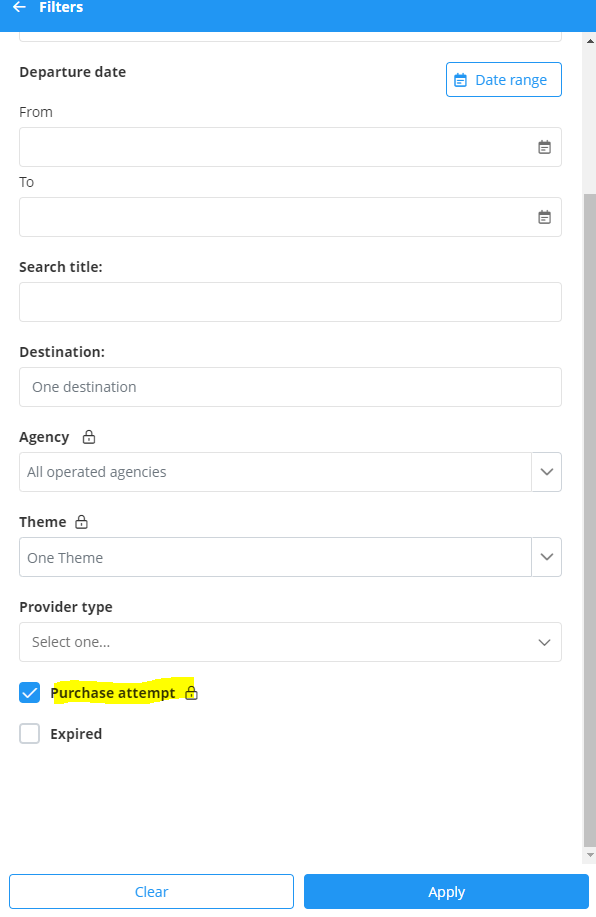
Here we can check to stored purchased attemps that the users of your microsite has been making. You can open the quotation and see what they where trying to buy. Normally fraud users will try to book services with immidiate check (same day or next day) and they will book 4 or 5 star hotels for one or 2 adult passengers. They can also book flighs for the same day or next day with the same patterns a normaly for routes in Indonesia or involving Mexican or Brazilian airports

SUSPICIONS CONFIRMED BEING A FRAUD USER, WHAT DO I DO:

We must deactivate the user. This will automatically unlog this user and no longer will be able to log in.

To do this open the users profile and deactivate it by clicking the bottom button BAN

Other feature is to block certain IP’s making these users enter inactivated. When a user registered from a blocked IP they will see a message that their user will require activation and they will receive an email once activated. You will receive an email informing about that user registration.

After verifying the information you can activate in form the user section of the back office. Please use the button SAVE AND SEND WELCOME EMAIL so the user received a notification of user being activated.

You can block IPS from our back office section MICROSITES —>DESTINATIONS under the MANUAL REGISTRATION OPTION.

The last feature that we have if to block certain services if the booking users is from a certain country of the user is booking services to or from a certain country.

If enabled, only flight bookings within any fraud risk country will not be booked with the providers. For the rest of the booking types, if all services are in a fraud risk country and the start of those services is within 21 day or less it will be considered fraud a none of the services of that booking will be made. Also, if contact person is from that country the booking will be considered fraud

These are the veryfications that we do with the microsites that we operate. We try to do this for all the microsites in the system, but in many occasions we do not know well the clients profile and market of each microsite, making these checks less accurate. It seems a lot of work, but with experienced agents it’s easu to stop fraud users from the notifications screen.

Was this helpful?

Yes  No
Related Articles
  • Colectivos
  • Tipos de Microsite
  • Transportes
  • Ebooking
  • Peculiaridades/personalizaciones
  • Tickets / Actividades

Didn't find your answer? Contact Us

Previously
Proveedores Acceso BI
Up Next
Ataque/posible fraude
Copyright 2026 Travel Compositor. All Rights Reserved